
Every life is a story worth keeping.
Easy Family Histories is an app for iPhone and iPad that asks a parent or grandparent about their life out loud, one question at a time, and writes the answers into a family history the whole family can read.
Coming soon to iPhone and iPad
There’s no waiting list to join. When it’s ready, you’ll find it on the App Store.
How it works
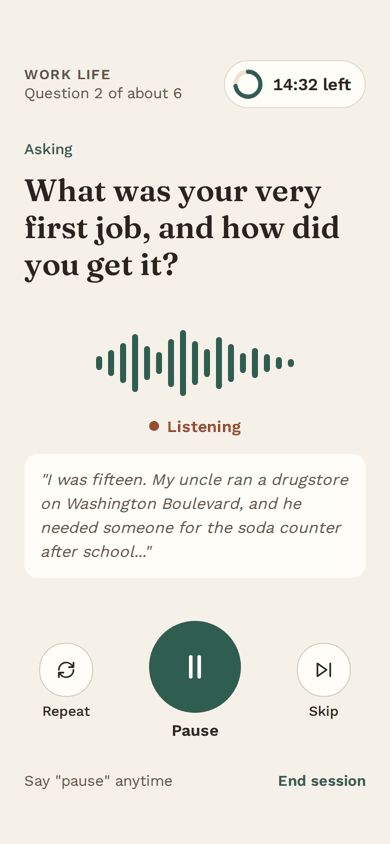
It works like a conversation.
The person telling the story doesn’t type a thing. They just sit back and talk.
-
Start a family account
Set it up for your mom, your dad, or yourself. One family can keep several people’s stories, and brothers and sisters can be invited to read and help.
-
She answers out loud
On your phone while you sit together, or on her own iPhone or iPad. She taps the link you text her, or types a 12-digit number. There’s no password for her to remember.
-
Her story is written
A few minutes after each session, her answers become warm chapters in plain words, written from what she said. You can read them, fix any detail, and share them.
Choose 10, 20, 30 or 45 minutes, or no time limit. Say “pause” whenever you like, and “I’m back” when you’re ready; your place is kept, even for days. When about two minutes are left, you’ll get a gentle heads-up. It never cuts anyone off mid-sentence.
What it does
Made for telling, not typing.
Everything is built around the voice, with large, clear text for anyone who wants to read along.
-
A friendly voice that asks, then listens
The interviewer reads each question aloud in a natural-sounding voice, then listens. Would you rather ask the questions yourself? The app stays quiet, shows you what to ask, and keeps her answers.
-
Remembers, and follows up
Mention an uncle, a hometown or a first job, and it asks more about them. Next time it picks up where you left off. Say “I’d rather not talk about that,” and it won’t ask again.
-
Nine chapters of a life
Answers are written in warm, plain prose, in her own words as much as possible, and organized into chapters:
- Roots and family
- Growing up
- School days
- Work life
- Love and marriage
- Raising a family
- Faith and beliefs
- Later years
- Advice for the family
Written as “Ruth grew up in Ogden…” or as “I grew up in Ogden…”, whichever feels right.
-
Old photos, new stories
Add photos from your library, or scan old prints with the camera. “Tell me about this picture” becomes one of her questions, and the photo goes into her book.
-
“Which is right?”
If she said “a few weeks” once and “a month” later, it asks which is right instead of guessing. Anyone in the family can also fix a detail, and their fix is kept.
-
Already started? Bring it in.
Import a history someone has begun, as a PDF, a Word document, a text file or pasted text. Its words are kept as written, and the interviewer asks about what’s missing.
-
Easy to read, easy to hear
Choose a comfortable text size on each phone or iPad. The app works with larger text (Dynamic Type), VoiceOver and Reduce Motion, and on an iPad the questions are shown large, easy to read at arm’s length.
-
Share it, and keep a copy
With a full history, send a private link. Relatives can read the story, listen to it read aloud, hear passages in her own voice if she says yes, and download a PDF book or an audiobook, without signing in. You can turn a link off whenever you like.
Anyone in the family can save a copy of the whole story, with every recording, at any time. That’s free, always.
For families
Setting it up for a parent or grandparent
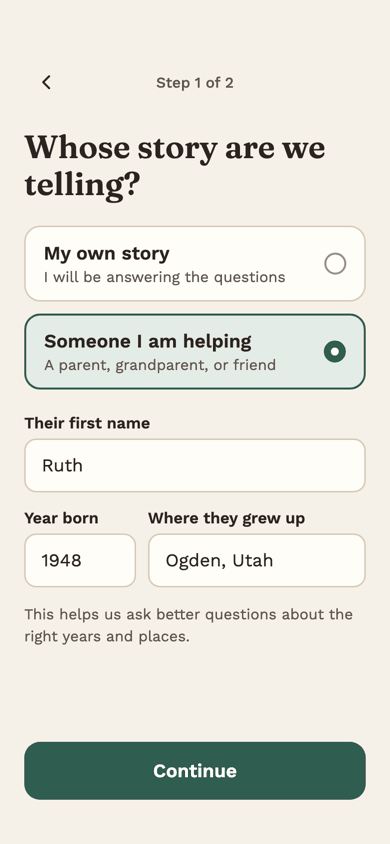
Many family stories get told because someone makes it easy. Create the family account, choose “Someone I am helping”, and enter their first name, the year they were born and where they grew up. That helps the app ask about the right years and places.
- Sit together for the first session. Before anything is recorded, she is asked by name, out loud, whether that’s all right.
- Or set up her own iPhone or iPad: text her the invitation link, or read her the number over the phone. Two people can share one iPad; it asks, “Who’s telling today?”
- Start with a short session. Ten or twenty minutes is plenty for a first try.
- Set a reminder for a regular time to talk. It reaches her phone too.
- Invite brothers and sisters to read along and help. You approve each one.
What it costs
Try it free. Pay once per storyteller.
No subscription. The story is never held back, whatever you decide.
Prices are in US dollars; the App Store shows the price where you live.
-
Free to try
Every family’s first 45 minutes of interviews come with all the AI help, shared by everyone in the family. Plus one imported document and ten photos.
Reading, fixing and saving a copy of a story are free, always.
-
A full history: $99
A one-time purchase for one storyteller, through Apple. It includes 20 hours of interviews (a whole life usually takes 10 to 20), up to 500 photos and 10 imported documents, and share links with the book, the audiobook and, with her okay, her own voice.
-
Fair and simple
Nothing renews. If the hours run out, sessions still work and her answers are kept word for word. Refunds are handled by Apple, and a refunded story stays readable. The person telling her story never sees a price.
A look inside
Calm, clear and unhurried.
Big text, big buttons and one thing at a time.
Screens show an example story.
-
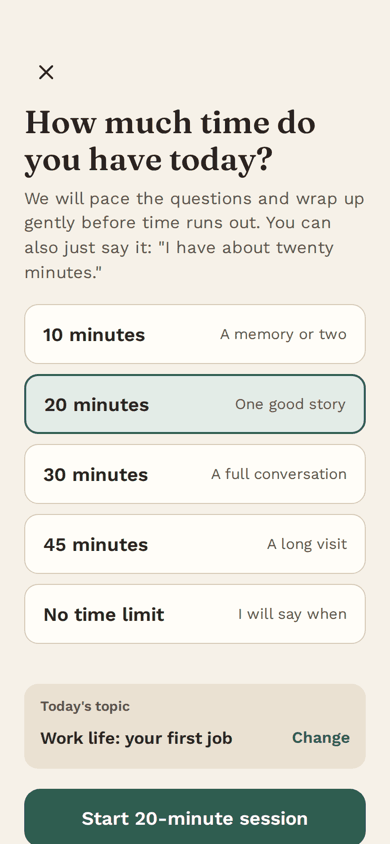
Choose how long today’s session is. -
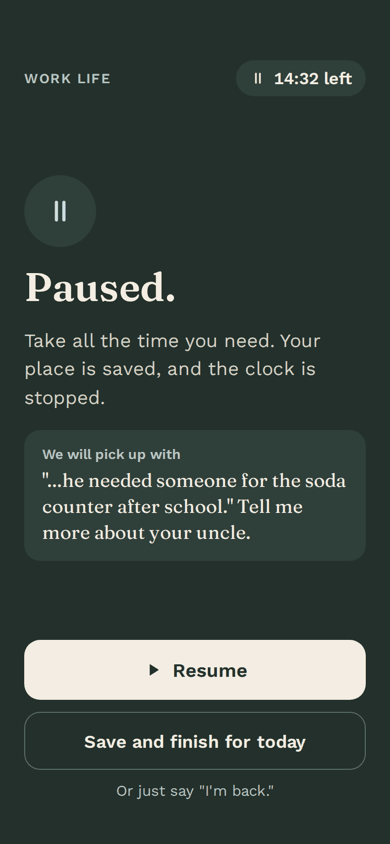
Paused. The clock stops and your place is saved. -
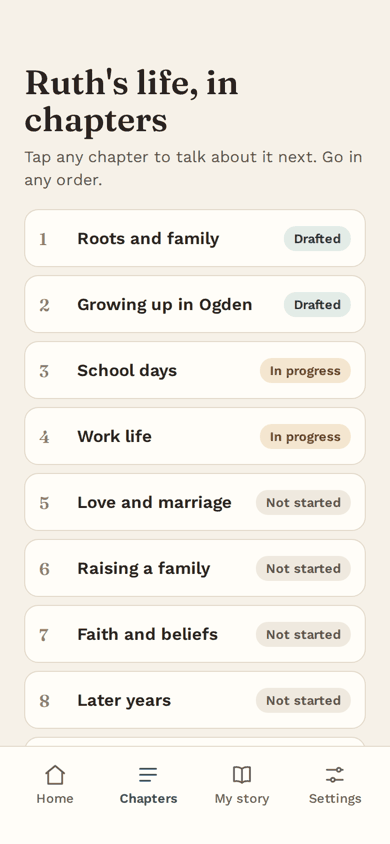
A life, told in chapters. -
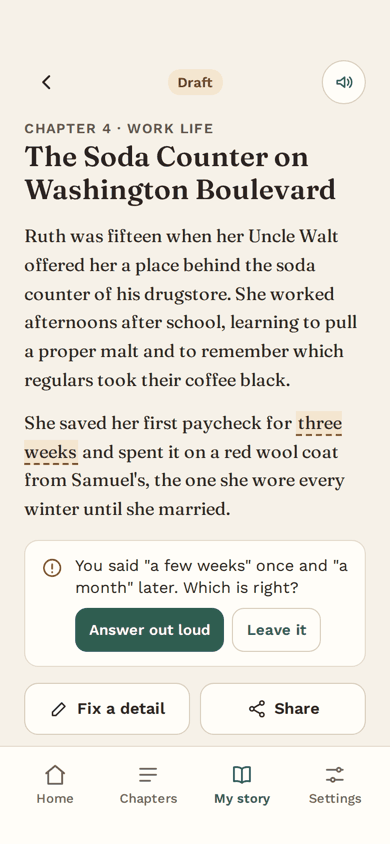
When details disagree, it asks.
Privacy
Her story stays in the family, unless you share it.
Stories are kept in a private family account that only invited people can read. Before anything is recorded, the storyteller is asked, by name and out loud, whether that’s all right. With her okay, outside services turn her recordings into text and read the questions and her story aloud, and an outside AI service writes the chapters and suggests follow-up questions. Photos are never sent to AI. Our privacy policy explains exactly what is kept, who helps us, and for how long.
- No ads, and we never sell or rent anyone’s personal information.
- No cross-app tracking, and no analytics in the app or on this website. This website uses no cookies.
- Turn off a shared link at any time.
- She can ask for her own story to be deleted, and the family can delete a story, the family or an account in the app.
Every story starts with one question.
Easy Family Histories is coming soon for iPhone and iPad, with iOS 17 or later. If you have questions in the meantime, we’d be glad to hear from you.